Here you'll find ready-to-use text and screenshots for promoting CaptureStudio. You may also
freely use all text and images from this entire website for your own promotion — whether on
your blog, newsletter, social media, or video. The only requirement: link to your personal
promo link.
🔗
Don't forget: replace the placeholder [YOUR-PROMO-LINK] in
every text snippet with your own referral URL, e.g.
https://www.inspiredsoftware.de/go/capturestudio#aff=YOUR-AFFILIATE-ID. Only
then will a sale referred through it be automatically attributed to you. Details on the
affiliate page.
Text snippets
Copy & publish directly
Short, medium, or long — pick the snippet that fits your channel, add your promo link, and
publish right away.
Short · Social media (X, LinkedIn, Facebook)
Just tried CaptureStudio: record the screen and a speaker in sync, have clicks automatically highlighted, and export a finished, portable video – no editing software required. Free, full-featured 14-day trial: [YOUR-PROMO-LINK]
Medium · Newsletter teaser / blog intro
Still building tutorials, bug reports, or short product demos out of screenshots, arrows in an image editor, and long explanations? CaptureStudio takes care of that: screen and speaker (webcam + microphone) are recorded in sync, mouse clicks are automatically highlighted during recording, and the result is exported as a portable folder with its own browser player – shareable even without installed player software. Try it free with full features for 14 days: [YOUR-PROMO-LINK]
Long · Blog article / product overview
CaptureStudio is a recording tool for Windows that captures the screen and a speaker (webcam + microphone) in sync – with no cloud and no separate video editor. A window picker lets you choose either the entire screen or a specific window as the capture area, regardless of which application it belongs to.
During recording, a live self-preview shows the speaker their own camera image for orientation, without ever appearing in the recording itself. Mouse clicks are automatically highlighted – choose from five styles (ring, filled circle, ripple, dot, crosshair) – which is especially useful for tutorials with small UI elements. A floating control bar shows elapsed time and offers a mute toggle for the microphone.
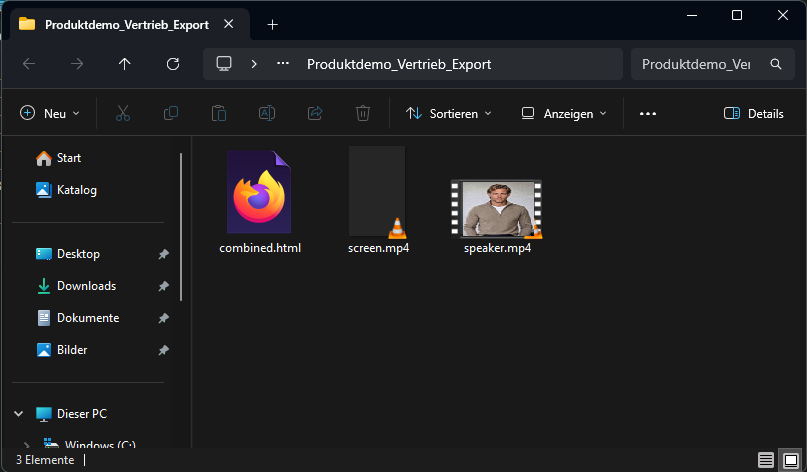
Right after stopping, a preview opens: the screen large, the speaker as a freely movable picture-in-picture overlay on top – save, export, or discard with one click. Recordings are organized permanently by project, including metadata such as date, time, and duration. Export creates a self-contained folder with screen.mp4, speaker.mp4, and a combined combined.html that plays both videos in sync in the browser – shareable even without installed player software.
CaptureStudio targets anyone creating tutorials, bug reports, or short product demos: support and QA teams, trainers, IT service providers, and individual users. It offers a free, full-featured 14-day trial; afterwards, a one-time license for €49 per workstation replaces a subscription. More information and the free download: [YOUR-PROMO-LINK]
Email template
Subject: A tip for tutorials & bug reports: CaptureStudio
Hi,
I wanted to recommend CaptureStudio – a recording tool for Windows that I use myself / have looked into.
The idea: record the screen and a speaker (webcam + microphone) in sync, have mouse clicks automatically highlighted, and export the result as a portable folder with its own browser player – no editing software and no cloud required.
Free, full-featured 14-day trial available here: [YOUR-PROMO-LINK]
Best regards
Short description for tool directories / listings
CaptureStudio records the screen and a speaker (webcam + microphone) in sync, automatically highlights mouse clicks for tutorials, and exports a portable video with its own browser player – no cloud, no video editor required. Free 14-day trial, then a one-time license instead of a subscription.
Images
Screenshots for your promotion
Use our official images on your own website, blog, or social media posts — link them with
your personal promo link and earn commission on every sale you refer through it. Just click
"Download".
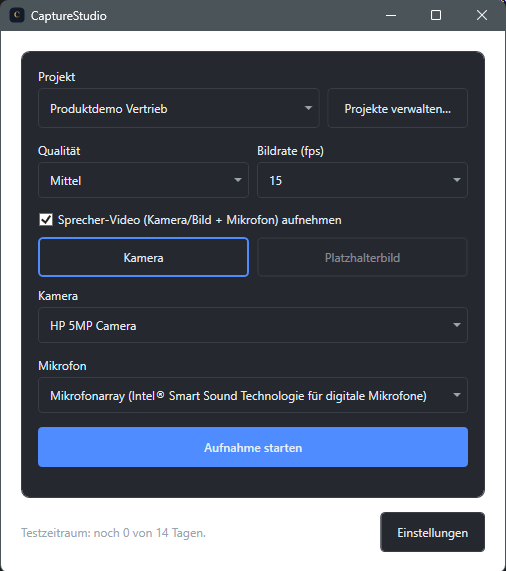
Screenshot: main window
Project selector, quality/frame-rate settings, and start button at a glance.